
Using Expressions to Add Icons in Diagrams
Diagrams
Expressions and Flags
I wanted to put an icon next to people who died young – for example under the age of fifteen so unlikely to ever have children. To do this right-click on a diagram to bring up the Diagram Options box. Click the Tabs box and look at the list of expressions.
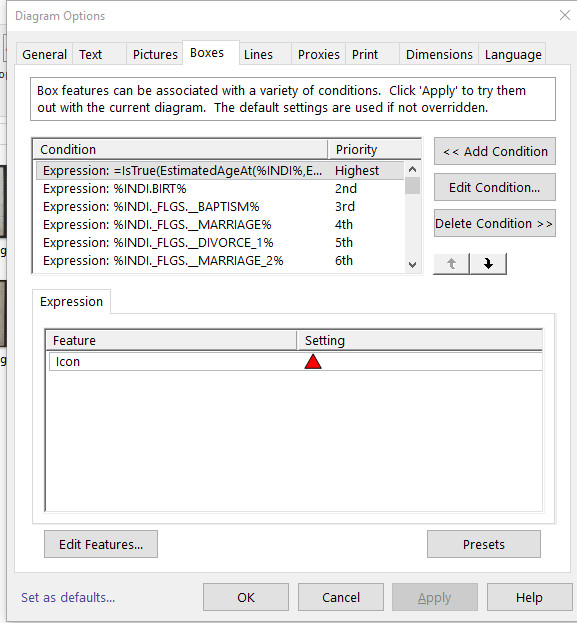
Click on Add Condition Here I added the expression into the Data Reference panel.
=IsTrue(EstimatedAgeAt(%INDI%,EstimatedDeathDate(%INDI%,MID,2),AVG,2) < 15)
Basically this looks at the age or estimated age if no exact birth is given and calculates the difference between that and the age at death or the estimated age at death. Then if that number of years is less than 15 it can do a number of things as detemined by what you do in the Edit Features box
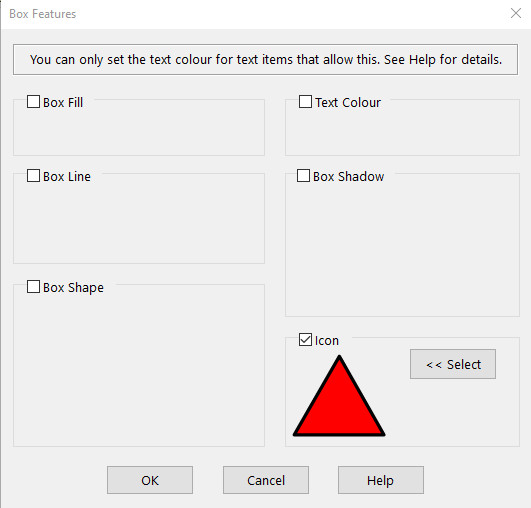
Here you can change text colour, add box lines etc. I chose to add an icon. You then select the icon you want from the stock icons or you can create your own. The position of this icon is determined by its place in the list of conditions. I made it the highest because it made sense to put it at the front of any list of icons to be displayed. If you want it ordered differently, then use the up/down arrows to arrangr the items accordingly.
There are examples in this post of the Family Historian Users Group web site
At the moment most of the icons I have are made to appear by virtue of the person being flagged. However, it would probably be better if they could be automatically populated by haveing an expression trigger the icon. An example would be for census returns where I trigger the icon using this expression
%INDI._FLGS.__1911_UK_CENSU%
Whereas perhaps I should try
%INDI.CENS[year=1891]%
or Caroline O’Neil suggests this
%INDI.CENS[year=1891].DATE:YEAR%
Im not sure what the difference is but her primer (which I have downloaded) can also be seen here.
Expressions Explained
(from https://www.fhug.org.uk/kb/kb-article/understanding-expressions/)
Introduction
These are an advanced feature of Family Historian, and occur in a variety of contexts where it is needed to extract and/or act on and/or compare data values.
Queries to specify Columns, Row filters, and Titles
Diagram Text Schemes to define the content of Diagram Boxes
Diagram > Options > Boxes > Conditions to define box style since ƒh V4
Reports to define Data items in certain Report Sections
Customise or Print Records Window Columns or Named List Columns
Captions and Custom Fields in Property Boxes
Narrative Report Fact Sentence Templates since ƒh V6
Override Templates for Fact displays since ƒh V6
See (ƒh7) Expressions and Contexts of Use or (ƒh6) Expressions and Contexts of Use for a fuller list.
Expressions
Expressions are composed from two technical features:
Data References, that often appear enclosed within percentage signs, e.g. %INDI.BIRT%
Functions, that begin with an = sign (except when used within another Function), e.g.=RecordId()
They also often involve Operators such as + - * / = < >and or etc.
If having trouble displaying all the text in fields such as Note or Text From Source[/glossary-ignore}, see Display long text such as Notes.
Examples
The technical details are explained in the cross-references given above, so this section is a compilation of Expressions that FHUG members have found useful. Remember that certain components are interchangeable. For example Individual Facts such as INDI.BIRT, INDI.BAPM, INDI.CENS, INDI.RETI, INDI.DEAT, and even just INDI or INDI.NAME can often be substituted for each other, but Family Facts such as INDI.FAMS>MARR or INDI.FAMS>DIVor CUR_FAMS>MARR are different.
Record Id
Expression
Description=RecordId( )
Record Id of current record, usually INDIvidual=RecordId( %SOUR% )
Record Id of current SOURce record=RecordId( %INDI.~SPOU>% )
Record Id of current Spouse Individual record=RecordId( %INDI.FAMC>% )
Record Id of current Parents Family record
Fact & Name Fields
Expression
Description=Exists( %INDI.RETI.DATE% )
True if 1st Retirement Event has a Date defined=Exists( %INDI.BAPM.SOUR>% )
True if 1st Baptism Event has a Source Citation=Exists( %INDI.CENS[year=1901]% )
True if any Census Event has a Date in 1901=Exists( %FAM.MARR.PLAC% )
True if 1st Marriage Event has a Place defined=Exists( %INDI.FAMS>MARR.PLAC% )
An alternative to the preceding example=Exists( %INDI.FAMS[2]>MARR.PLAC% )
Similar alternative, but for a 2nd Marriage Event=ExistsText( %INDI.~CHIL>%, Text( %INDI.~CHIL>% . " (" . LifeDates2(%INDI.~CHIL>%) . ")" ) )
Gives 1st Child’s Name and bracketed Life Dates=TextPart( %INDI.BIRT.PLAC%, 3, 1, STD )
Gives 3rd comma separated part of Birth Place=TextPart( %INDI.DEAT.ADDR%, 2, 0, TIDY )
Gives 2nd and subsequent tidied parts of Death Address=IsTrue( %INDI.RELI% = "Roman Catholic" )
True if Religion attribute value is Roman Catholic=IsTrue( ( AgeAt( %INDI%, %INDI.DEAT.DATE% ) >= 1 ) and ( AgeAt( %INDI%, %INDI.DEAT.DATE% ) <= 5 ) )
True if died aged between 1 and 5 years (needs a Birth & Death Date)=IsTrue( AgeAt( %INDI%, EstimatedDeathDate( %INDI%, MID, 2 ) ) < 21 )
True if died aged less than 21 years (needs a Birth & Death, Burial, or Cremation Date)=IsTrue( %INDI.BIRT.DATE:XDATETYPE%="Date" and %INDI.BIRT.DATE:DAY%>0 )
True if simple exact Date with Day, Month & Year=GetField( %INDI%, "%INDI.CENS[year=" . ["Year"] . "]%" )
Compose complex Data Reference with Query prompt=FieldText( GetRecord(%FACT%), 'INDI.NAME:SURNAME' )
List Surname of owner of Fact in a Query=FieldText( FactOwner(%FACT%,1,MALES_FIRST), 'INDI.NAME:SURNAME_FIRST ')
List in Surname order with Surname first=Field( FactOwner(%FACT%,1,MALES_FIRST), 'INDI.NAME:SURNAME_FIRST' )
List in Surname order with Surname last
Typically %INDI.XXXX…% above can be replaced by %FACT…% in Fact Queries.
Source Citation Fields
Expression
Description=IsTrue( %INDI.CENS[year=1871].SOUR>_TYPE% = "Census" )
True if a Census Event in 1871 has 1st Source Citation with a Type of Census=ContainsText( %INDI.BAPM.SOUR>TITL%, "Baptism", STD )
True if 1st Baptism Event has 1st Source Citation with its Title/Name containing Baptism (Note STD is default and thus optional)=IsTrue( Exists( %INDI.FAMS>MARR.SOUR>% ) or Exists( %INDI.FAMS[2]>MARR.SOUR>% ) or Exists( %INDI.FAMS[3]>MARR.SOUR>% ) )
True if 1st or 2nd or 3rd Marriage Event has a Source Citation=ContainsText( %CUR_FAMS>MARR.SOUR>TITL%, "Marriage" )
True if 1st Marriage Event has 1st Source Citation with Title/Name containing Marriage for use in Diagrams in ƒh V6=IsTrue( ( %INDI.BIRT.SOUR>_TYPE% = "Birth" ) or ( %INDI.BIRT.SOUR[2]>_TYPE% = "Birth" ) )
True if 1st Birth Event has 1st or 2nd Source Citation with a Type of Birth=IsTrue( ContainsText( %INDI.BAPM.SOUR>TITL%, "Baptism" ) or ContainsText( %INDI.BAPM.SOUR[2]>TITL%, "Baptism" ) or ContainsText( %INDI.BAPM.SOUR[3]>TITL%, "Baptism" ) )
True if 1st Baptism Event has 1st or 2nd or 3rd Source Citation with its Title/Name containing Baptism
Typically %INDI.XXXX…% above can be replaced by %FACT…% in Fact Queries.
Relationships
Expression
Description=IsAncestorOf( %INDI%, FileRoot() )
True for all Ancestors of the File Root=IsAncestorOf( %INDI%, Field( FileRoot(), 'INDI.~FATH>' ) )
True for paternal Ancestors of File Root=IsAncestorOf( %INDI%, Field( FileRoot(), 'INDI.~MOTH>' ) )
True for maternal Ancestors of File Root=Relationship( FileRoot(), %INDI% )
Textual relationship of Individual to File Root=Relationship( %CUR_FILE_ROOT%, %INDI% )
Textual relationship of Individual to File Root in FH V6=Relationship( FileRoot(), %FAM.HUSB>% )
Textual relationship of Husband of Family to File Root%INDI.NAME:ADORNED_FULL% (=LifeDates2()) is =Relationship( FileRoot(), %INDI% ) of =FileRoot()
Individual Summary Report > Report > Options > Format > Heading > Record with relationship of Individual to File Root%INDI.NAME:ADORNED_FULL% (=LifeDates2())=TextIf( IsRelativeOf( FileRoot(), %INDI% ), Text( " is " . Relationship( FileRoot(), %INDI% ) . " of " . FileRoot() ), "" )
As above, but copes with an unrelated Individual{default} are =Relationship( FileRoot(), %FAM.HUSB>% ) and =Relationship( FileRoot(), %FAM.WIFE>% ) of =FileRoot()
Family Group Sheet > Report > Options > Format > Heading > Record with relationship of each Spouse to File Root
Sentence Templates
These are found in Tools > Fact Types > Edit and affect Narrative Reports as discussed in Narrative Report Fact Sentence Templates.
The following are alternatives to the word married in the Marriage Event default Sentence Template.ExpressionDescription{=TextIf( %CUR_PRIN.SEX% = %CUR_PRIN2.SEX%, "entered a Civil Partnership with", "married" )}
Same Sex Civil Partnership{=CombineText( "entered a ", GetLabelledText( %FACT.NOTE2%, "Status: " ), " with", "married" )}
Labelled Note Status: Ceremony
Override Templates
These are found in Tools > Fact Types . Select a Fact and then the Edit button and then Advanced.They affect Fact displays in the Property Box Facts tab and the Records Window Individuals tab. These examples indicate the presence (*) or lack (-) of Sources and presence (+) or lack (-) of Media for each Fact. Note how using {abbr} {value} {place} adds the Place field to Attributes that do not include it by default. For another example see Witness Facts.
Expression
Description{=TextIf( Exists(%FACT.SOUR>%),"*","-" )}{=TextIf( Exists(%FACT.SOUR>OBJE>%),"+"," -")} {abbr} {value} {place}
Source & Media in Facts tab{=TextIf( Exists(%FACT.SOUR>%),"*","-" )}{=TextIf( Exists(%FACT.SOUR>OBJE>%),"+"," -" )} {abbr} {date} {place}
Similarly for Records Window{=TextIf( Exists(%FACT.SOUR>%),"*","-" )}{=TextIf( Exists(%FACT.SOUR.OBJE>%),"+"," -" )} {abbr} {value} {place}
Citation & Media in Facts tab
ƒh V6.1 and above can show a Media icon in the Facts tab More column if any Media are attached to the Fact, its Citations, or its Sources.